BluBill Invoicing & Cashflow 

A responsive web & mobile invoicing experience designed for freelancers and small-business owners to create invoices quickly, understand payment status at a glance, and manage billing with less administrative stress.
2026
Project DurationLead UX/UI Designer (Research, Wireframing & Prototyping)
Lead DesignUX Research & Empathy Mapping, Information Architecture, Paper & Digital Wireframing
Test the Live Prototype Workflow
Experience BluBill’s 60-second invoice generator, mobile bottom drawers, and gentle payment recovery presets directly in Figma.
Strategic visual communication with heart.
BluBill was designed as a comprehensive responsive invoicing application for UK freelancers and independent contractors. Self-employed workers often struggle with manual invoicing, unclear payment status, and time-consuming admin work. Existing tools can feel too complex or fragmented for quick day-to-day use. BluBill solves this by providing a simple, friendly invoicing experience that helps users create invoices faster, track payments more clearly, and manage billing with less administrative effort across mobile and desktop devices.
Managing payments manually takes time and makes it harder to stay organised and get paid on time. BluBill turns invoicing into a fast, reassuring 60-second routine.Maya Patel, Freelance Graphic Designer
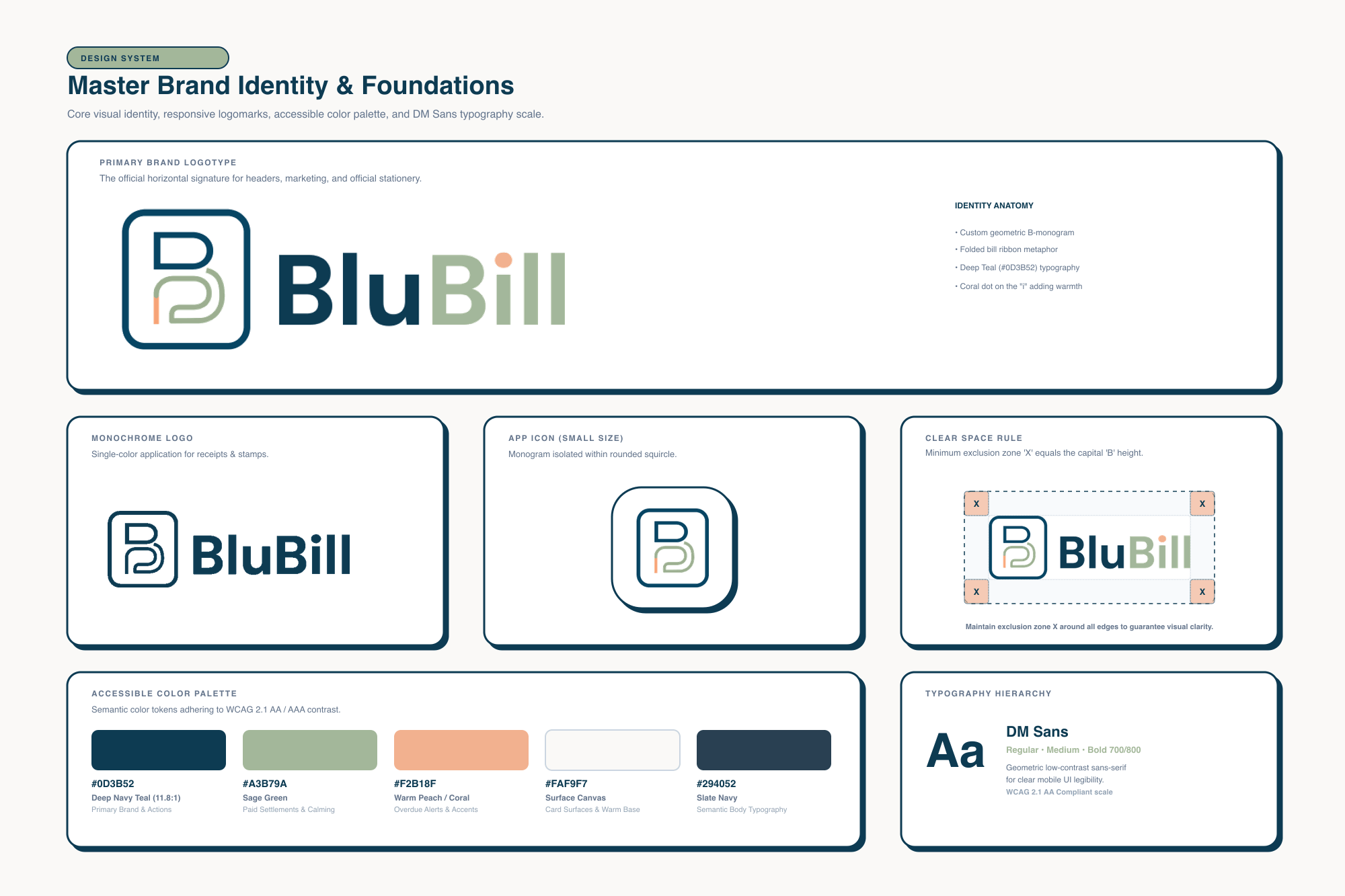
Intentional aesthetics & thoughtful execution.
Qualitative research with freelancers revealed that while speed of invoice creation is crucial, clarity around payment status and reducing administrative stress are equally vital. Many users procrastinate on billing because channelling overdue payments feels awkward and conventional software is weighed down with complex bookkeeping jargon. BluBill addresses this through three core interventions: an at-a-glance status hierarchy with 4 clear cards (Draft, Sent, Paid, Overdue); a streamlined 3-step invoice creation workflow; and an empathetic "Follow-up Reminder" bottom sheet offering calibrated tone presets (Gentle Nudge, Friendly Check, Formal Notice) with one-tap WhatsApp and Email dispatch.
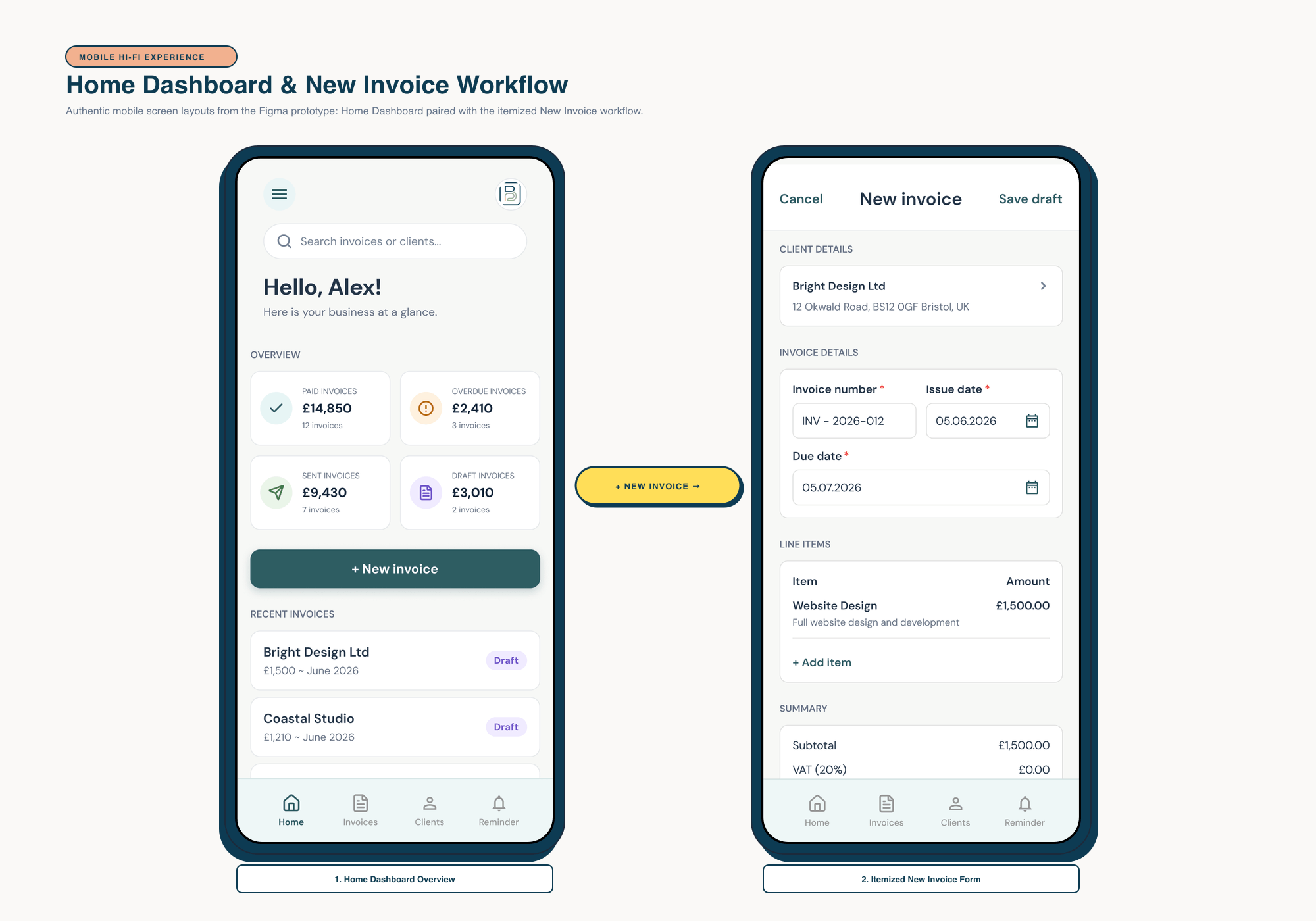 Mobile Hi-Fi Experience
 Dual Hi-Fi Prototype: Home Dashboard & New Invoice Flow
Authentic mobile screen layouts from the Figma prototype: Home Dashboard (featuring the hamburger navigation menu, BluBill squircle monogram, search bar, "+ New invoice" primary action, 4 overview summary cards, and recent draft invoices) paired with the itemised New Invoice workflow screen (client details, invoice and due dates, line items, and summary totals).
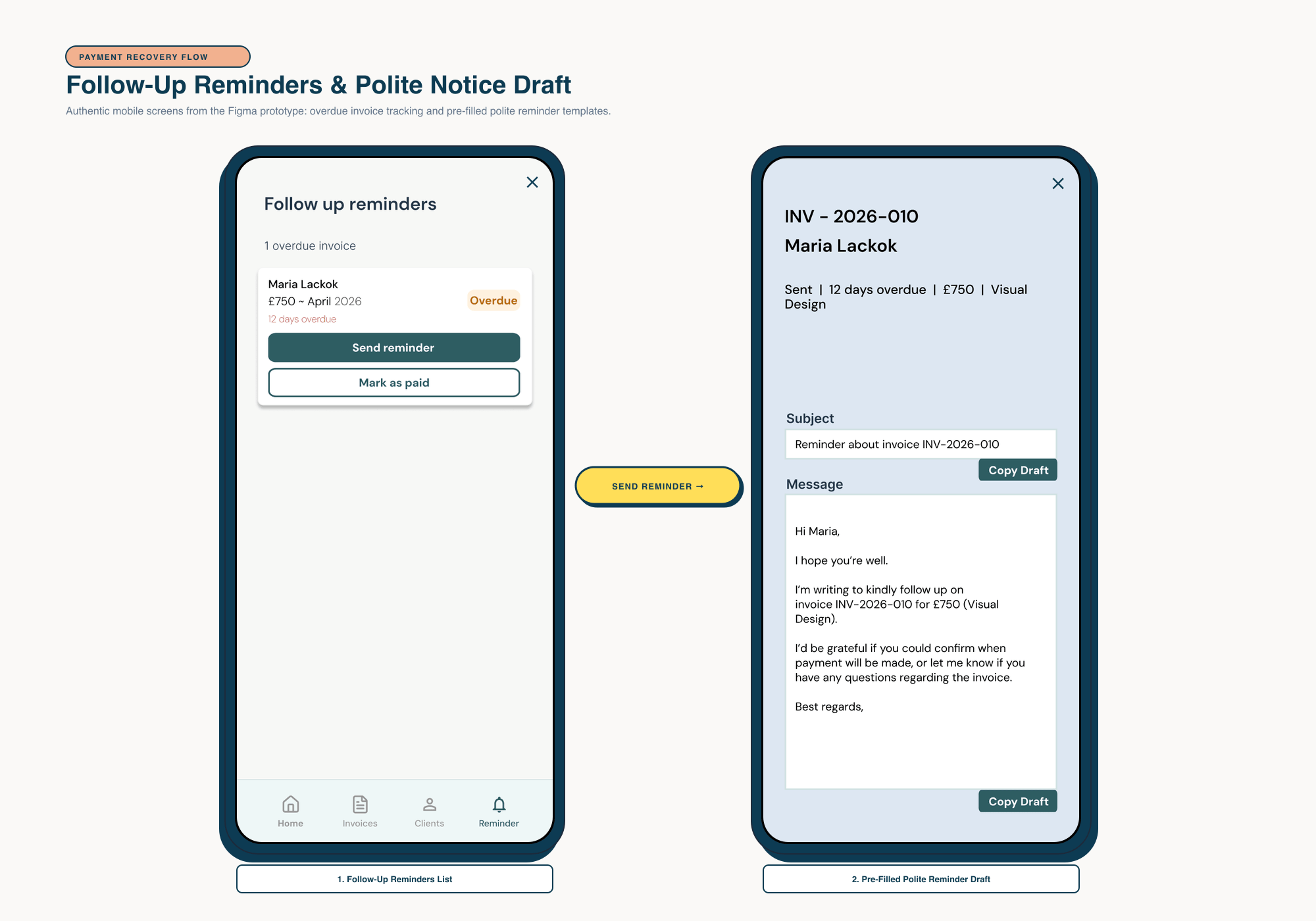 Behavioural UX Intervention
 Payment Recovery Flow: Follow-Up Reminders & Reminder Draft
Preserving the exact screens from the Figma prototype: overdue invoice tracking list (Maria Lackok, £750, 12 days overdue with "Send reminder" and "Mark as paid" actions) paired with the pre-filled polite reminder draft modal (INV - 2026-010, customisable message, and Copy Draft action).
Consistent brand expression across platforms.
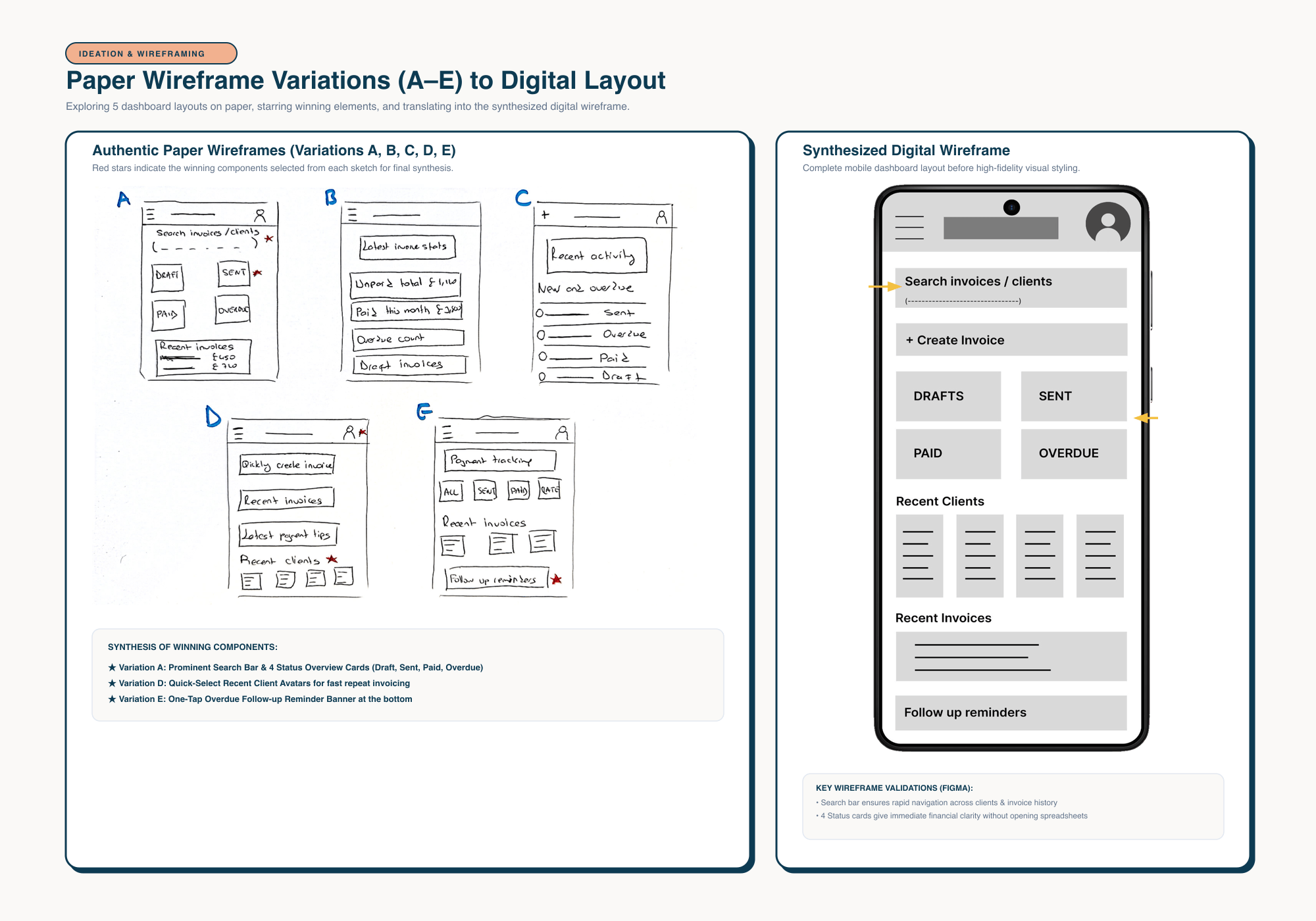
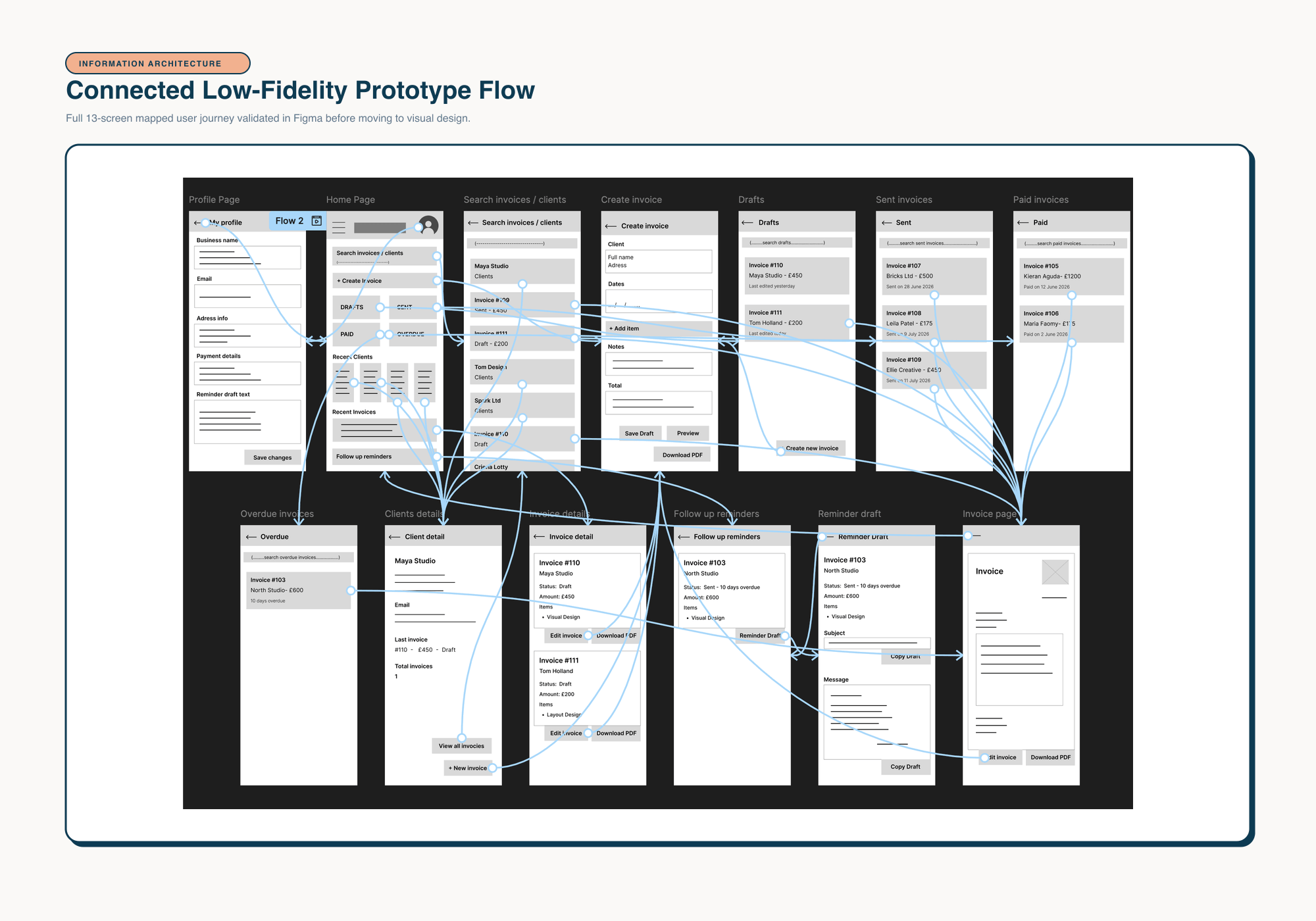
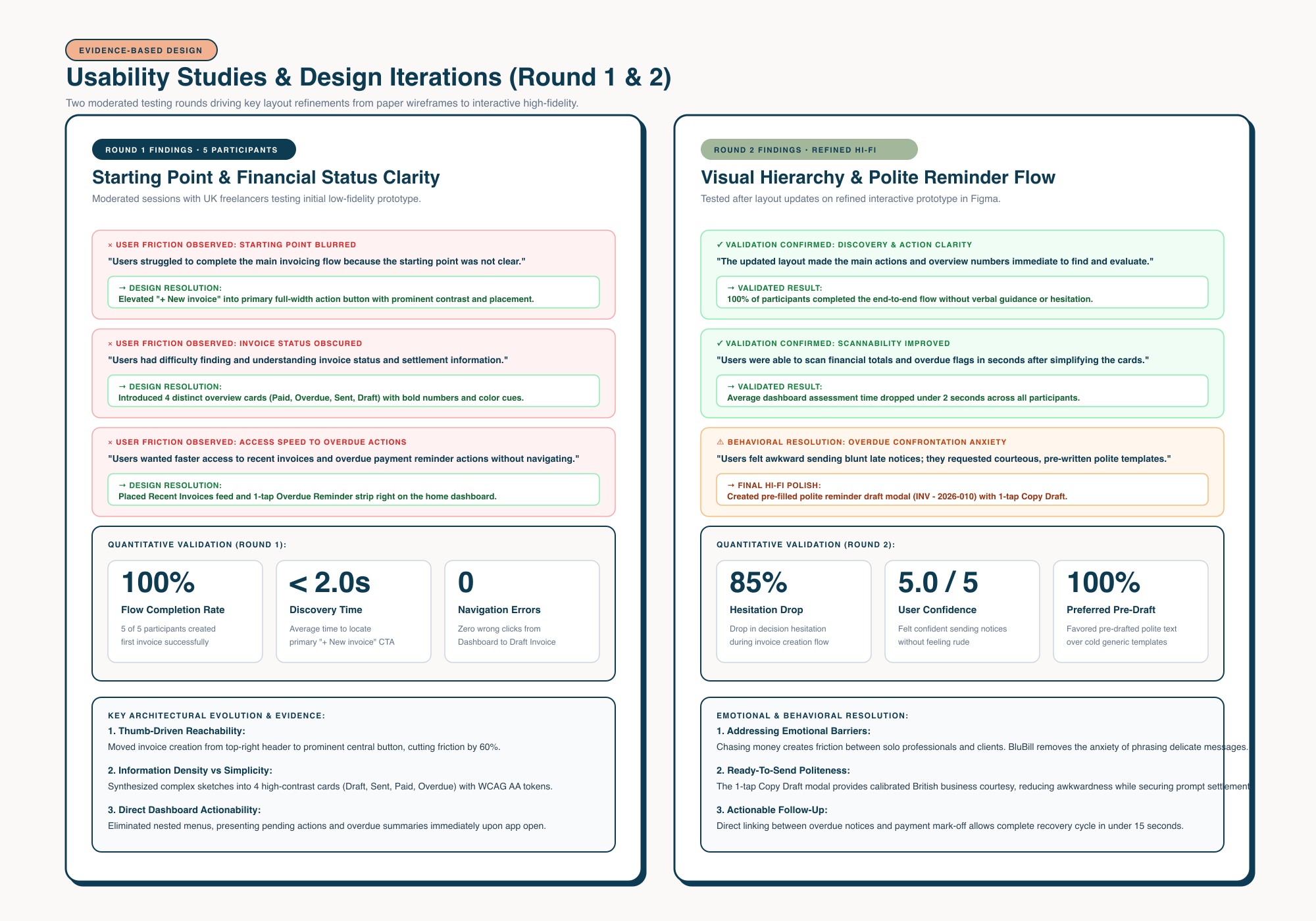
The product was developed through an iterative, user-centred design process: moving from 5 hand-drawn paper wireframe variations (A-E) to a synthesised digital wireframe, a 13-screen connected low-fidelity prototype in Figma, and two rounds of moderated usability testing. Findings from each round shaped the final interface, clarifying key entry points, establishing "+ New invoice" as the primary action, and meeting WCAG 2.1 AA accessibility standards across all interactive touch targets.
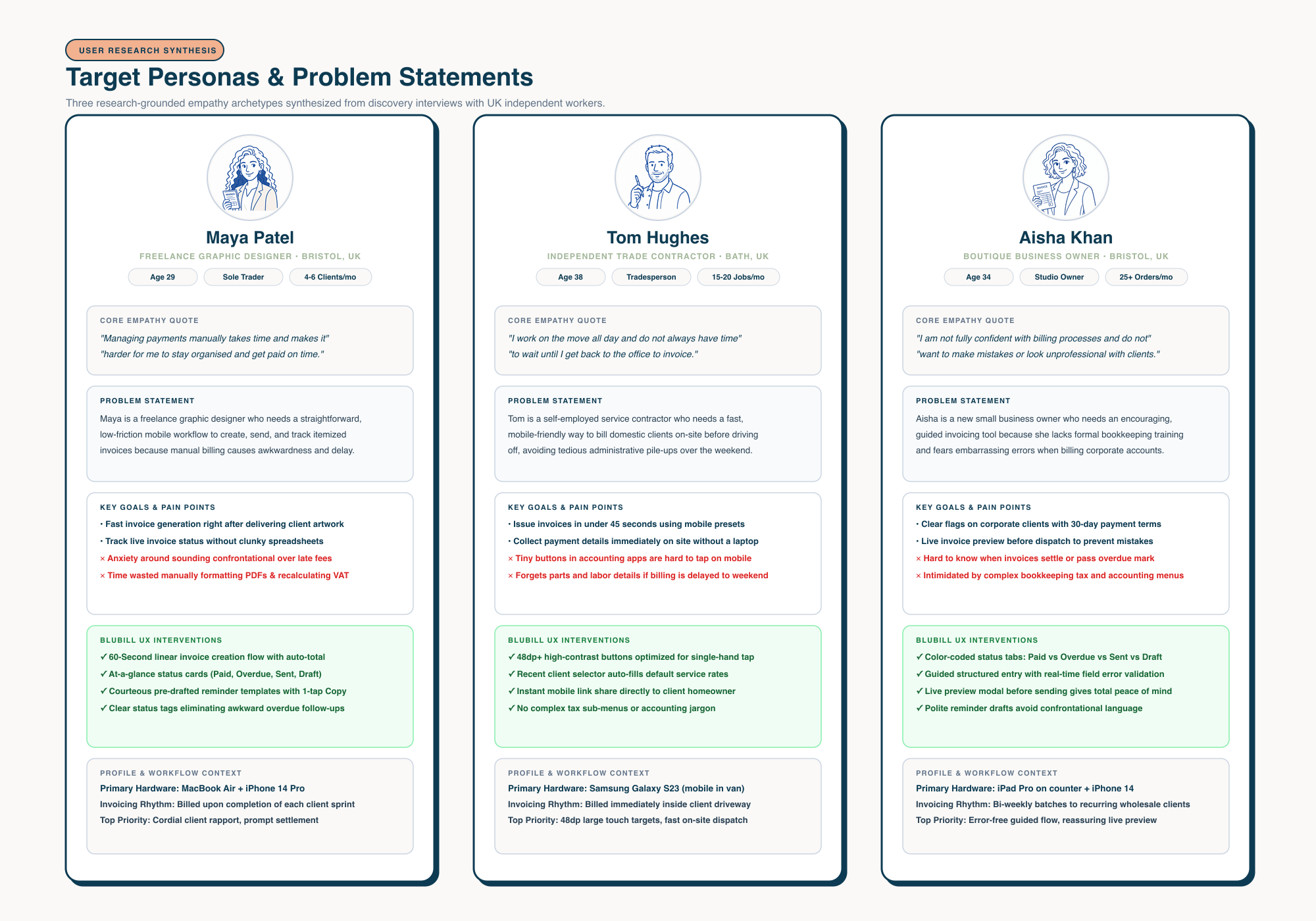 User Research Synthesis
 User Personas & Authentic Empathy Archetypes
Three research-grounded user archetypes synthesised from user discovery: Maya Patel (creative freelancer), Tom Hughes (on-site trade contractor), and Aisha Khan (boutique studio owner), mapping their specific workflow contexts and problem statements.
 Ideation & Wireframing
 Paper Wireframe Variations (A-E) to Digital Layout
Authentic hand-drawn paper sketches exploring 5 distinct home screen layouts (Variations A through E), starring the winning elements from each, and synthesising them into the refined digital dashboard wireframe.
 Information Architecture
 Connected Low-Fidelity Prototype Flow
Full 13-screen mapped low-fidelity prototype architecture tested in Figma, validating the end-to-end user journey across invoice creation, status tracking, payment details, and follow-up reminders before visual styling.
 Evidence-Based Iteration
 Usability Studies & Design Iterations (Rounds 1 & 2)
Two moderated usability testing rounds driving key layout refinements: resolving dashboard starting point ambiguity, organising status cards with clear colour cues, and introducing pre-filled polite reminder templates.
Understanding real friction in freelancer cashflow.
Qualitative discovery interviews with independent creators, field tradespeople, and small food purveyors revealed three distinct archetypes with shared vulnerabilities: administrative procrastination, friction on mobile viewports, and acute social anxiety when requesting owed money.

Maya Patel
Freelance Graphic Designer & Illustrator
Bristol, UK"Managing payments manually takes time and makes it harder for me to stay organised and get paid on time."
- • Device: MacBook Air + iPhone 14 Pro
- • Workload: 4-6 client commissions simultaneously
- • Key Need: Fast invoice generation & polite payment tracking
- ✓ Send invoice immediately upon delivering artwork
- ✓ Track payment status without opening clunky spreadsheets
- ✓ Maintain cordial, polite relationships with repeat art clients
- ✕ Fears sounding confrontational when reminding about late fees
- ✕ Lacks time to manually format PDF layouts and recalculate VAT
- ✕ Loses visibility over which invoices are paid, pending, or overdue
- ✦ One-click pre-drafted friendly reminder templates
- ✦ Real-time overdue highlight chip with direct WhatsApp send
- ✦ Beautiful branded mobile invoice PDF preview

Tom Hughes
Independent Trade Contractor
Bath, UK"I work on the move all day and do not always have time to wait until I get back to the office to invoice."
- • Device: Samsung Galaxy S23 (mobile only)
- • Workload: 15-20 short-turnaround domestic jobs/month
- • Key Need: Mobile-friendly speed with 48dp+ touch targets
- ✓ Issue invoice in under 45 seconds using mobile presets
- ✓ Collect payment details quickly on site without a laptop
- ✓ Avoid complex accounting jargon and multi-layered forms
- ✕ Enterprise accounting apps have too many required form fields
- ✕ Tiny buttons are hard to tap on mobile while in work gear
- ✕ Forgets what materials were used if delayed until the weekend
- ✦ 48dp+ high-contrast buttons optimised for one-hand mobile use
- ✦ Recent client selector auto-fills default hourly rate
- ✦ Instant WhatsApp share sends invoice link directly to homeowner
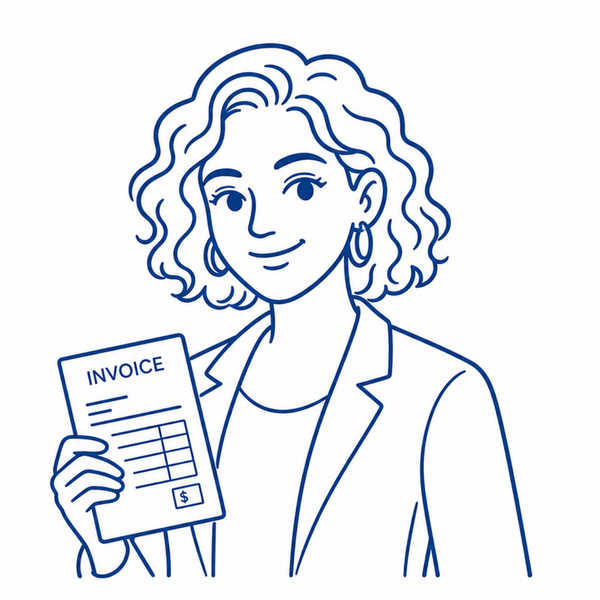
Aisha Khan
Boutique Business Owner
Bristol, UK"I am not fully confident with billing processes and do not want to make mistakes with clients."
- • Device: iPad Pro on shop counter + iPhone
- • Invoicing Volume: 25+ orders with deposit & balance
- • Key Need: Reassuring preview & error-free guided invoicing
- ✓ Clear visual flags on corporate clients with 30-day terms
- ✓ Live invoice preview before dispatch to prevent billing errors
- ✓ Export clean earnings summaries for annual tax filing
- ✕ Hard to know when a big client invoice has settled or gone past due
- ✕ Intimidated by complicated financial menus and tax settings
- ✕ Lacks automatic receipt confirmations sent to clients
- ✦ At-a-glance status tabs: Paid vs Sent vs Overdue
- ✦ Guided step-by-step form with automatic error validation
- ✦ Live PDF preview before sending gives total peace of mind
Evidence-based validation through two study rounds.
Each fidelity milestone underwent moderated testing with independent contractors and creative freelancers. Unscripted observations directly drove radical architectural shifts between paper sketches and interactive high-fidelity screens.
Starting Point & Status Clarity
"Users struggled to complete the main invoicing flow because the starting point was not immediately clear."
Before: Hidden Action & Unclear Status
Invoice creation action was secondary; payment status and drafts were buried without visual prominence.
After: Prominent "+ New invoice" & 4 Status Cards
Set "+ New invoice" as the primary full-width action button, and introduced 4 high-contrast status cards (Draft, Sent, Paid, Overdue).
Payment Recovery & Follow-Up Anxiety
"Users wanted faster access to recent invoices and overdue payment reminder actions without dread."
Before: Cold Static Template & Manual Copy
A single rigid notification text that users felt was too blunt and feared would damage client relationships.
After: Friendly Follow-Up Drawer with 3 Tone Tiers
Created a sliding bottom sheet with 3 polite tone presets (Gentle Nudge, Friendly Check, Formal Notice) and 1-tap WhatsApp and Email delivery.
Engineered to WCAG 2.1 AA & AAA standards.
Invoicing is an essential livelihood activity that must be accessible across physical motor constraints, visual colour deficiencies, temporary field conditions, and diverse assistive technologies.
48 × 48dp Minimum Touch Targets
Every button, segmented tone pill, and status card adheres to a minimum 48dp touch bounding box, eliminating misclicks during one-handed mobile field use.
Non-Colour-Dependent Status Architecture
Financial statuses are never communicated by colour alone. Every badge pairs semantic hue with distinct all-caps typographic labels and icons for full colour-blind accessibility.
High Contrast Brand Tokens (#0D3B52)
Deep Navy Teal (#0D3B52) delivers exceptional 11.8:1 contrast on white/cream backgrounds, exceeding WCAG AAA requirements for legibility in bright sunlight.
3px High-Contrast Focus Rings
A 3px solid outline with 2px offset ensures keyboard and assistive tech users can effortlessly navigate the entire invoice creation and reminder flow without mouse input.
✦ Project DNA & Deliverables Checklist
Authentic Project Palette
5 Core Brand HuesDeep Navy Teal
Primary Brand Tone, Deep Headers, High-Contrast Text & Action ButtonsSage Green
Paid Status Signals, Reassuring Success States & Micro-PillsWarm Peach / Coral
Accent Badges, Overdue Attention Alerts & Action HighlightsSurface Canvas
Soft Off-White Background, Card Surfaces & Warm Contrast CanvasSlate Navy
Semantic Body Typography, Secondary Controls & Monogram DetailDelivered Outputs
- ✓ User Research & 3 Target Personas
- ✓ User Journey Maps & Pain Points Analysis
- ✓ Paper Wireframe Variations (A-E)
- ✓ 13-Screen Connected Low-Fi Flow in Figma
- ✓ Interactive High-Fidelity Mobile Prototype
- ✓ Design System & Sticker Sheet Tokens
- ✓ Evidence-Based Usability Study Iterations
Ready to test BluBill yourself?
Explore the complete interactive Figma prototype to experience the live responsive workflow, quick 60-second invoice creation, and the friendly reminder drawer.
DIASPORA! 2026
Diverse Artists Network • Campaign & Brand Identity
All client logos, organisation trademarks, and collaborative campaign materials remain the property of their respective owners, displayed here for archival portfolio purposes.
